Environment VFX - Alien Desert
Summary:
A collaborative project with Anna Christensen as part of our specialization for TGA.
Mannequin models by DNC44.
Premise:
I was involved from early on, focusing on collaboration, supporting the artist and creating dynamic particle systems and shaders, which could easily be placed into the scene and react to a central "pulse". I created all visuals surrounding the pulse - as well as the systems reacting to the pulse.
This was a super exciting project as we worked very closely, supporting and learning from each other with our different skillsets, throughout the entire development process. This dynamic resulted in a lot of ideas and opportunities I never could have come up with on my own, and it was super motivating to share our excitement with each other about the project!
Context:
Locked camera angles, for in-game/pre-rendered cutscenes.

My tasks:
- Handling particle systems
- Managing VFX- & environment shaders and logic
- Implementing mesh destruction and vertex animation pipelines
Anna's tasks:
- Creating environment assets and textures
- Developing environment materials and effects
- Establishing procedural rock and foliage pipelines
Procedural mesh shattering and vertex color:
I created a pipeline in Houdini to allow for giving an input-mesh to be "shattering" a section from, using a second mesh to define what was subtracted.
Each piece was then given a uniform vertex color, using a gradient from a point, so the color would become between 0 to 1 depending on how close each piece is to the given point.


This allowed for dynamic vertex animation without the need for exporting Vertex Animation Textures from Houdini. Instead I was applying an offset, multiplied by the color - which could then be smooth-stepped to push the pieces back together:

For a more in-depth explanation of my workflow in Houdini, check out my blog post on the subject here:
Distance-field decals (vertex based):
I created a system that would allow sand meshes to "cling" to other objects, without the use of traditional decals. This was done by using distance fields and distance to nearest surface, to push vertices in the distance field direction, offset from the surface by a given amount.


Pulse mask - pressure:
I created a material function that could easily be reused in different materials, to determine if a given pixel was affected by the pulse, then lerp between the affected and unaffected states.


Combined with the decal system and angling the decals to align with the amazing rock models that Anna created, we can get a "clinging residue" effect as the pulse passes over.

I started the design of this function in Desmos, by visualizing the wavefront in a graphing calculator.

I adapted this math into my material, with some modifications to create both a wavefront and an the "inside" of the pulse-affected area:

Pulse mask - direction:
Another important part of the pulse is the direction it pushes in. By having one object assign itself as the center coordinate, I created two material functions to reference this value, allowing UVs to scroll away from it, and surface normals to detect if they were facing the center:

The UV direction for the sand, scrolling the XY-plane:

The "facing pulse" mask, which highlights any face aligning with the vector from the object to the pulse location:
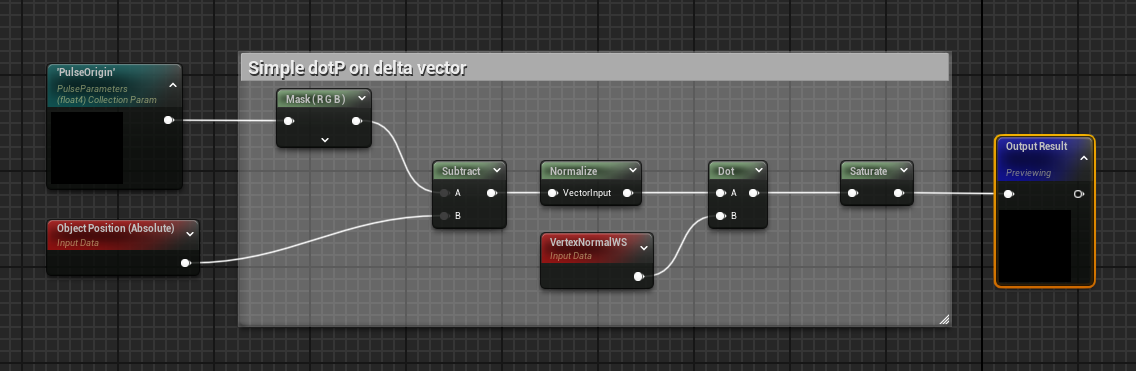
This made it quick for Anna to integrate the logic into her own materials, seen here on both the "ghost" people and on the surrounding vine objects:

Directional particles:
This setup is mirrored in the particle systems, calculating a delta vector and giving it as a user parameter, making it possible for particles to always fly away from the center.

A little extra legwork had to be done for the directional vector calculations. I realized afterwards that Unreal has this built in, but it was fun to make so I kept it as-is, which also opens up for better customizability down the line:

Using this logic in blueprints with particle systems, makes it quick to create reactive, directional particles - from ribbons to debris, flying from both the plant people, the altar and the rocks in the environment:

The visible wavefront of the pulse is just a mesh with an animated material on it. Scaling this alongside a spherical collider, is what enables me to trigger other particle systems in the environment, as blueprints with the particle systems within them, detect the overlap and trigger the effects:

Particle systems:
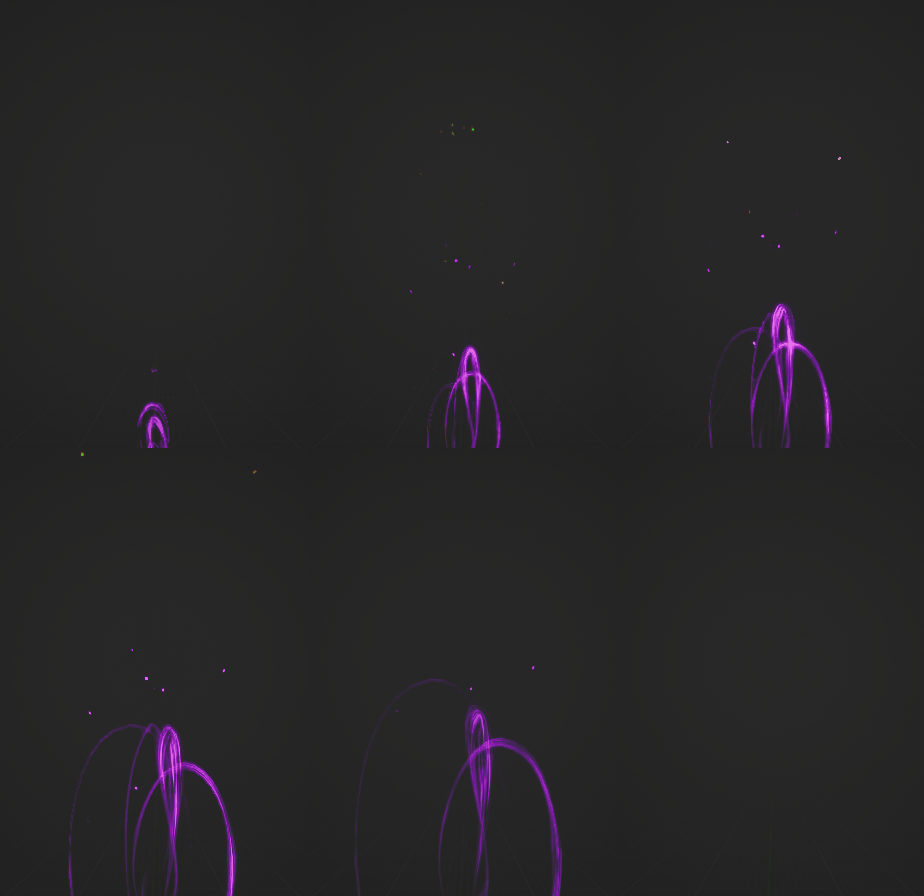
Most of the particle systems are fairly simple, owing to the ease of using the pulse direction parameter. The most interesting technique I've used is in the ribbons, where I've defined drag value based on particle ID, which is how I have created the flares and tails emitted from the egg and the people surrounding it:

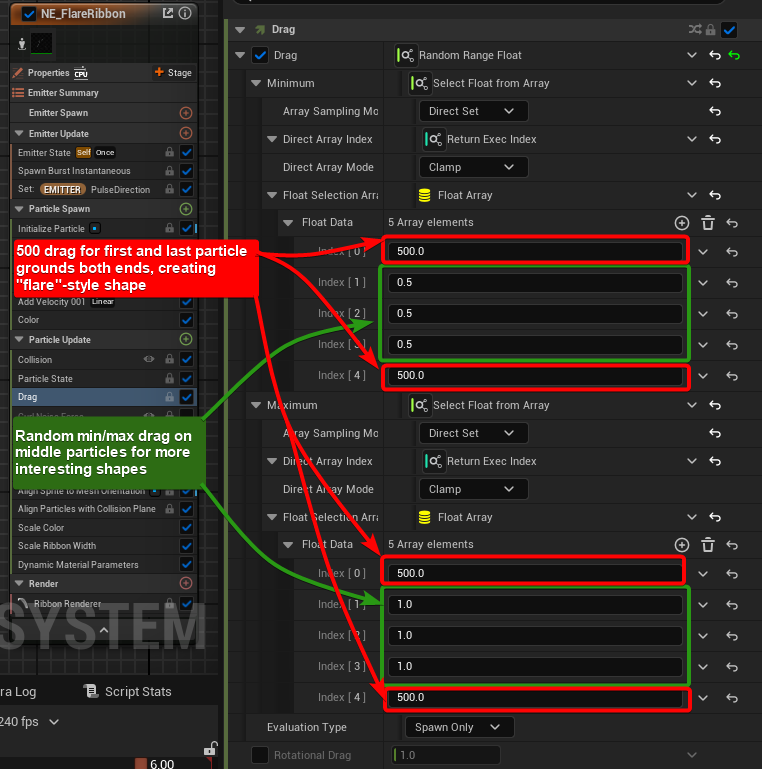
The same approach was used to create trail-shapes as well, by only grounding one end instead of both:

By combining a handful of these on the egg object and around the environment, it creates the look of a solar flare, which trails from the source and clings to the immediate surroundings:


The directional spores and trails from the plant people:
The directional debris from the edges of rocks being chipped:

The flicker and motes being pulled during buildup:

Simple decal animation

Light function to ground the color and motion from the decal, into the rest of the environment

The logic for the light function is a radial panner, which is then displaced in worldspace to make the center fit where the pulse origin is:

If I had more time:
- More dynamic visibility scaling in relation to the camera, for using lots of emitters across a long distance (from up-close to far away)
- Easier adjustability of particle systems and materials, for better per-shot changes for renders
- Created UI for modifying core system parameters more readily (pulse speed, sand decal brightness, pulse falloff timings)
- More performance optimization. While this was largely built for pre-rendered cutscenes, I always aim to have more performant particle systems and shaders.
- Better breaking up of mesh particle shapes. It is a little too easy to see the meshes themselves rather than the energies they imply.
- More unique textures for the project; I reused some effects textures I had made for past work, just to save time. This makes the shape language a little bit inconsistent in some areas.
- The lighting and fake lighting combination acts a little weird around the altar - some areas that should be in shadow are brightened, while others that should not are in the dark.
LEGAL:
I am part of The Game Assembly’s internship program. As per the agreement between the Game Industry and The Game Assembly, neither student nor company may be in contact with one another regarding internships before April 23rd.
Any internship offers can be made on May 6th, at the earliest.